
Stripe One-Time Purchases
Use Stripe one-time prices for lifetime access or consumable purchases in web checkout.
Superwall supports Stripe one-time prices in web checkout. Use them when a customer should pay once instead of starting a recurring subscription, such as:
- Lifetime access to a paid tier.
- Credit packs, tokens, or other consumable quantities.
- One-off digital goods or upgrades.
Stripe one-time purchases use the same web checkout flow as subscriptions. The difference is the Stripe price type and how you attach entitlements in Superwall.
Stripe calls these one-time prices in the API and one-off prices in parts of the dashboard.
Create the price in Stripe
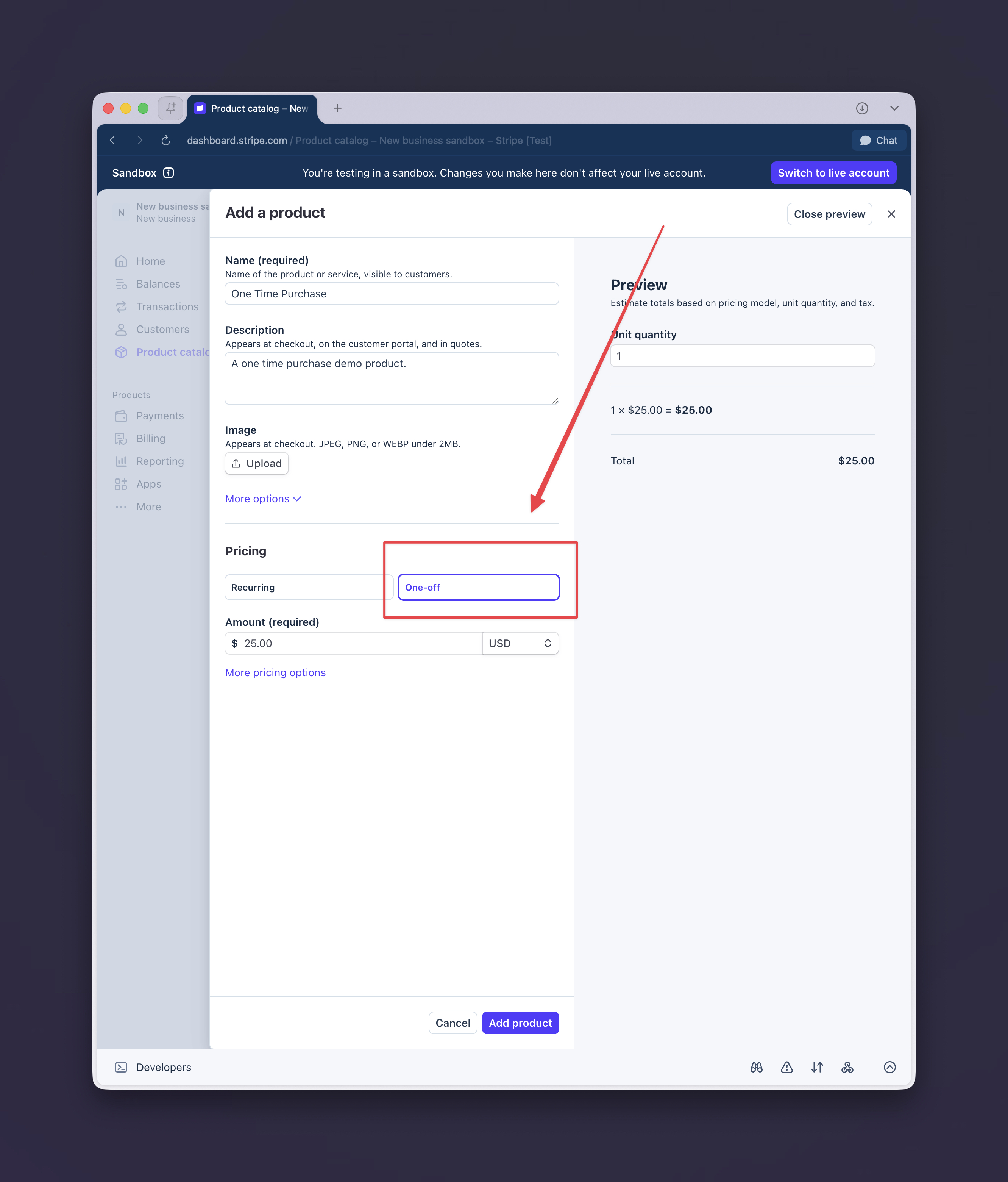
Create or open the product in Stripe, then add a price with One-off selected instead of Recurring. Superwall reads the Stripe price type when you import the product.
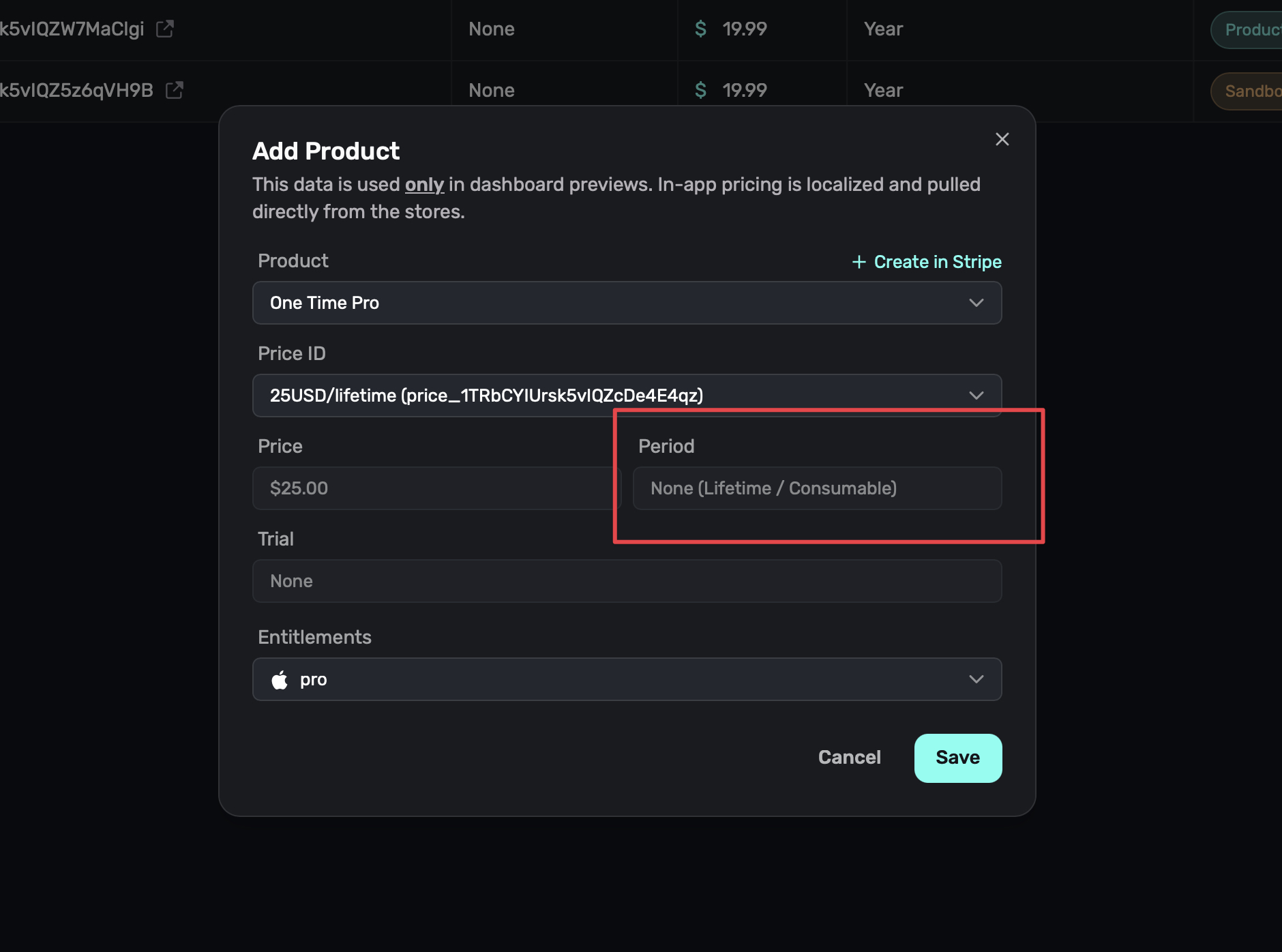
After the Stripe price exists, import it from Creating Products. In Superwall, one-time prices appear with a period of None (Lifetime / Consumable).
Choose the access behavior
Superwall uses entitlements to decide whether a one-time product unlocks ongoing access or behaves like a consumable purchase.
| Purchase type | Entitlement setup | Result |
|---|---|---|
| Lifetime access | Attach the entitlement the product should unlock. | The user gets active, non-expiring access to that entitlement after purchase. |
| Consumable purchase | Leave the product without an entitlement. | The purchase is recorded in CustomerInfo.nonSubscriptions, but it does not make the user's subscription status active. |
For example, a "Premium Lifetime" product should usually be linked to your pro entitlement. A "100 Credits" product usually should not be linked to an entitlement; instead, use the transaction record to credit the user's account in your own system.
Do not attach an entitlement to a consumable unless buying that consumable should also unlock access permanently.
Checkout behavior
When a customer purchases a Stripe one-time price, Superwall creates a Stripe Checkout session in payment mode. This means:
- The customer pays once.
- No Stripe subscription is created.
- Trial fields are ignored for the one-time price.
- Revenue is tracked as a non-renewing purchase.
- The checkout session ID acts as the Stripe purchase identifier for that purchase.
The rest of the web checkout flow is unchanged. In Redeem mode, customers receive a redemption link and the SDK redeems the purchase in your app. In Redirect mode, Superwall redirects to your URL with purchase data.
Read purchase data in the SDK
Use CustomerInfo.nonSubscriptions to inspect one-time purchases. Each transaction includes the product identifier, purchase date, whether it is consumable, whether it has been revoked, and the store that fulfilled it.
For Stripe one-time purchases, the transaction's store value is stripe.
let customerInfo = Superwall.shared.customerInfo

for purchase in customerInfo.nonSubscriptions where purchase.store == .stripe {
  print("Product: \(purchase.productId)")
  print("Consumable: \(purchase.isConsumable)")
}
The redemption result still exposes Stripe purchase identifiers through the legacy stripeSubscriptionIds name. For one-time purchases, those identifiers can be Stripe Checkout session IDs instead of sub_ subscription IDs.
Related
How is this guide?